
 Special Advisory products have been issued. Use links below for details.


via nhc.noaa.gov
Monday, 1 August 2011
Google Plus Tips & Shortcuts - Local SEO Guide is Andrew Shotland's blog on local search optimization, small business marketing & search engine optimization strategy.
“the motherlode of Google+ tips for all y’all suckas that don’t know…” – Donny Rhoades
I figured it would be useful to put all of the Google Plus tips and shortcuts I have found thus far in one handy place. Please add any additional tips you discover in the comments.
Last Updated: 8/1/11 1:11 pm PST
BRANDS & BUSINESSES ON GOOGLE+
CHAT
CHROME EXTENSIONS
CIRCLES
COMMENTS
GOOGLE PLUS API
HANGOUTS
HOW TO MANAGE EMAIL NOTIFICATIONS
INCOMING
INVITATIONS
IPHONE APP
KEYBOARD SHORTCUTS
LINGO
MOBILE APP
NOTIFICATIONS
PHOTOS
PLUSRANK
PRIVACY TIPS & SPAM
PROFILE
READING POSTS/COMMENTS
RSS
SEARCH
SEND FEEDBACK
SHARING/MESSAGING
SPARKS
TEXT FORMATTINGBRANDS
- Google+ currently does not support “entities” that are not people, but they will in the future (see this discussion between Danny Sullivan and Brad Horowitz). G+ is now accepting applications for “entities” to participate in a “small experiment to see the effects of brands in the G+ experience”.
CHAT
- You have to click on the “Chat with people on Google+” link to enable chat within Google+ but then you get IM functionality.
- When chatting to people you can drag the top of the chatting box to resize the chatting window
- Go start a chat on Google Talk on your phone. Then go over to Google+. The conversation is all there.
CHROME EXTENSIONS
- +Everything:This extension adds the Google+ bar to all websites.
- +1 Button: Plus one every page you like with only one click, directly from omnibox, without any annoying popup
- Color Bar Changer: Changes color of Google Plus bar to green, pink or blue. Warning!: Unofficial, proceed with caution.
- Comment Toggle: Allows you to hide/show comments on Google+
- Extended Share for Google Plus: Share Google Plus posts on Facebook & Twitter
-Facebook Friend Exporter: Export your friends’ contact info from Facebook so you can import them into Google+ NOW BLOCKED BY FACEBOOK
- Facebook Like for Google Plus: Not exactly sure what this does but here’s the Google Translate version of this Chinese app description “Facebook more praise by praise ? painless transfer of Google Plus , the future of this product will continue to introduce more painless transfer function.”
- G+ Count in Title: Add Google+ notifications to your browser tab.
- G+ Extended: Additional shortcuts for G+. Including +1 (+), share (s) and expand comments (e).
- Google+ Filter Kynetex App: Filter out foul language, animated GIFs, etc from your G+ stream. Warning!:Unofficial, proceed with caution.
- G+ Lite: Google plus lite helps you to access google’s new social networking google plus in lite mode. Its really easy to use this lite version. Whatever that means.
- G+ Me: enables you to collapse and expand a string of comments: Warning!:Unofficial, proceed with caution.
- Google CSS Tricks Chrome Extension to pin the top of your G+ nav bar to the top of the browser screen as you scroll. Very Cool!
- Google Minus: This extension will notify you each time someone removes you from their circles. Warning!: Unofficial, proceed with caution.
- Google+ : Facebook: Make Google Plu look like Facebook. Classic. Warning!: Unofficial, proceed with caution.
- Google Plus HIde Comments: adds a Hide Comments or Show Comments link on each post (via Micah Wittman)
- GooglePlus Plus Hide Images: Hides the image on original post and all shared posts. Tired of an animated GIF that keeps getting shared over and over in different posts? – hide it once an forget about it. (via Micah Wittman)
- GooglePlus Plus Hide Sidebars: adds a feature to hide/show left and right side bars, and makes the main content wider. (via Micah Wittman)
- GooglePlus Plus Search With Google: Search Google Plu with the Google search engine using the site: filter. (via Micah Wittman)
- Google Plus Safari Extension: a Safari Extension to give your G+ notification counts as a badge over a button in the toolbar. Warning!: Unofficial, proceed with caution.
- Google Plus Tweakss: Tweaks to the layout and features of Google+ (Google “Plus”) Full width, thumbnails only, etc. (by Jerome Dane) Note: report of some issues with Google+ Tweaks
- Google+Tweet: integrates a full featured twitter client inside your Google Plus Account. Warning!: Unofficial, proceed with caution.
- The Google Plus Unofficial Chrome App: Appears to allow G+ functionality from a browser bar Warning!: Unofficial, proceed with caution.
- Hangout Auto Retry Again: Tired of clicking the try again button for Hangouts? Then install this (by Mohamed Mansour)
- Helper for Google+: Share G+ posts on Twitter and translate them with Google Translate. Nice.
- Hide Google Plus Notification: Simple extension to hide the little red Google Plus notification from the global google header toolbar.
- Liquid G+: Add a two or three column Google+ display(depending on your screen resolution) (hat tip to Cliff Wade) Warning!: Unofficial, proceed with caution.
- Notification Count for Google Plus: Extension for displaying unread notification count for Google Plus
- +PhotoZoom: Easily zoom photos and profile pics from your Google Plus Stream.
- Plus Minus and Usability Boost: The Google/Notification bar stays at a fixed position on top. Displays a direct link to mute post.
- Replies and More: Adds reply and reply-to-author buttons to Google+ comments
- Scroll To Top Button: Adds a scroll to top or bottom button for quick page navigation. (h/t Donna Fontenot)
- StartGooglePlus: Integrates facebook & twitter feeds and puts them on the sidebar. Warning!: Unofficial, proceed with caution.
- Surplus: Allows users to easily access their Google+ notifications and compose new posts from anywhere on the Web. So, this extension lets you read, comment and share without having to be on the Google domain.
CIRCLES
- New! How To Reorder Circles: Go over to the Circles tab and down to your circles. Now you can move your circles wherever you want, just by clicking and dragging with the mouse. Plus, that order will now show up everywhere across Google+, even in the dropdown menu when you add people to circles. (created by Brett Van Zuiden)
- New!: When in the circles tab, you can drag a circle up into the space where all your people are to view all the people for that circle (for those in-the-know, it’s called “Circle in Tab”)
- Recent clarification from Yonatan Zunger:
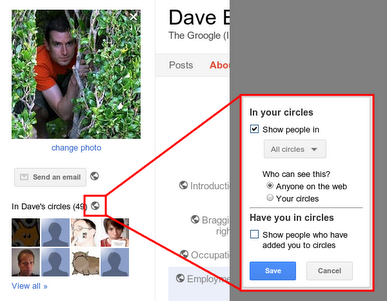
* If you edit your profile and click on the set of people in your circles, you can control whether or not people can discover who is in your circles. Note that even if it’s public, this just lets people know “Bob is in your circles” – it never reveals which circle people are in. (So it’s completely OK to have a “Jerks, but I want to know what they’re saying” circle.) I’d actually recommend leaving this fairly open; that way, people can go through you and find more people they know. I’ve got mine set so that my circles are visible to other people in my circles.
But one particularly useful thing you can do with this is to change the visibility on a per-circle basis. In particular, you can have some circles that anyone can find out about, some circles which are connections that only other people in your circles can know about, and some circles whose membership is completely private. If you have relationships you’re not comfortable broadcasting, use this feature, it gives you flexibility.
What does it mean for a circle membership to be private? It means that, if you’re only following a person via a private circle, the fact that you’re following this person will not be visible on either your publicly visible profile or theirs; it will be known only to you and to them.
Now, some caveats:
* No, we don’t have a “follow someone and don’t tell them you’re following them” mode. That would be creepy. You can always see who you’re following and who’s following you from your circles page, and when someone starts to follow you you get a notification.
* If that person follows you back, they would need to hide that separately. (If they wanted to) You could still show up on their profile as someone they’re following, and they could show up on your profile as someone following you, but you have control over whether or not you announce that you’re following them.
* If you add a person to both a private circle and a public circle, then the fact that you’re following them is still publicly visible.
* Also, if you change an existing circle from public to private, it may take some time until you disappear from their profile page. Don’t panic if you don’t disappear instantly… and if it’s really important to you to keep a relationship secret, keep it secret from the beginning. (Which is good advice for life in general)
* If you share with this private circle, and someone clicks on the “Limited” link, they’ll still see who can see that post. So if you don’t want members of this circle to know about each other, either, don’t put them all in the same circle and then share with that circle.

- Delete a circle to see a fun animation of the old circle rolling off screen. Create a circle just to delete it.
- Delete a member of a circle by pointing to their image in the circle, clicking on them and dragging them out. A circle will show only 13 member images, so the member you want to remove might not be depicted. In that case, click the circle, then click View Circle in Tab. That should display the members of that circle at the top of the screen, with your circles below. Select the member(s) you want to remove, and then click Remove at the top of the screen. (hat tip to Sue Mosher)
- Add multiple people to a circle by going to the Circles page, clicking on them in top section in sequence – they will highlight in blue – then dragging the last one to one of your circles. They will all get dragged along.
- To add people who have added you to their circles, but you haven’t add them, go to the “People who’ve added you” tab and select “Not yet in circles” from the sort menu. All the people not in your circles will be listed first (hat tip to Owen Prater)
- Right click on a circle and select “View circle in tab”. This is a terrific way to see who’s in a circle and allows you to do neat things like drag all the people inside it to another circle.
- To hide members of your Circles from others:
- Go to your profile
- Click “Edit your profile”
- Click the little icon next to the “In Abcd’s circles” section on the left
- Hide your shame!
(hat tip to Dave Bort)
(or try this shortcut supplied by Gary Boyer)- If you have a lot of Circles and/or a lot of people in your various Circles views (e.g. “People in your circles”, “People who’ve added you”, etc.”), Mac users can use the pinch functionality to make the Circles section smaller so you can view all of your Circles.
- Hit Ctrl – (minus) on the Circles page and you’ll have a lot more screen real estate to work with. This was a huge help to me. Ctrl + (plus) to zoom everything back up to size. Try it and let me know what you think. (hat tip to John Malin)
- Copy one circle into another circle.
1) Go to Circles.
2) Click on a circle.
3) Click “View circle in tab”.
4) On the top right click “More actions” -> “Select all”.
Then you can drag everyone from one circle into another circle.
(hat tip to Chris Cartland)- You can make a field in your profile or Post visible to a circle even without anyone in that circle to begin with, As and when you add more folks into that circle or circles the post/field automagically becomes visible to the new people you added. Just share it once to a circle and forget about it. (hat tip to Karthik Nagaraj)
- Following up on that last one, according to Jean-Baptiste Queru the default circles aren’t special, their names are. So if you want something to appear over “Friends”, you’ll have to name “Friends” differently; just creating a new “Friends” circle won’t work.
- Finding people on Google+ via keyword: On the Circles page where it says “find people” type in a keyword and press enter. It takes you to a search page full of google profiles of people that are associated with or have mentioned that keyword. From there you can add them. (hat tip to Nan Braun)
COMMENTS
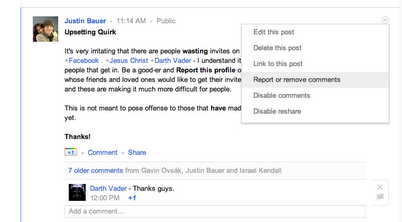
- You CAN remove comments on your posts, it’s just a 3 step process to do so, depicted in the following screenshots:
(Hat tip to Justin Bauer)- Are you having a conversation with someone who is in a lot of circles? If the comment’s in response to their own post, they’ll see it via their Notifications, so you can just respond.
But if the popular person added a comment to someone else’s posts, it’s likely they’re not paying attention to every post they commented on. (Once you have hundreds of followers, it becomes necessary to turn off some of the notifications before you get buried.) You can still continue the conversation, though; just +-mention them each time you respond to them. They’ll get a notification, and if they want to respond, they will. (hat tip to Trey Harris)
GOOGLE PLUS API
- Developers interested in the Google Plus API can sign up for the Google Plus Developer Group
HANGOUTS
- GPHangouts.com is a new service that shows scheduled Hangouts. Kind of like TV Guide for Hangouts.
- Use Google translate’s nifty “Listen” feature to communicate with people speaking other languages in Hangouts. http://translate.google.com/
- There’s currently no way to search for Hangouts and Googlers are saying they do this intentionally because having some sort of connection to the Hangout is important. To find Hangouts in your Circles. right now, the best way to do this is to hit the “Start a hangout” link and in the green room, if there are any live hangouts that have been announced to you, it’ll show there, and give you a way to jump over to them. if there aren’t any, you can close down the green room, and a Lonely Hangout post never appears on your stream if you’re self conscious about it
- Chee Chew on “The Lonely Hangout”: Some folks are self-conscious about starting a Hangout. The first few minutes are twiddle-thumbs/sing-to-yourself minutes. Try this instead…
Mute your video and mute your audio when you first start. Make sure your speakers are on! Then just throw the hangout in the background as you do other stuff. When someone drops in, they’ll say hello. Then go unmute your audio/video.
It’s kinda like sitting on your front porch reading the paper or whatever. Just go about your business, but there for friends to stop by and say hello.
Since you’re muted, you don’t have to be self-conscious about saying something, or doing something that someone accidentally sees/hears. We also drop the big video, so it’s not consuming as much CPU or network bandwidth.
And if, in case, you decide to leave the hangout before anyone joins, we’ll remove the post from your stream so that folks don’t know you had a lonely hangout
- Every hour in a Google Hangout you spend 720MB of bandwidth. So control your addiction if you have a limit on your consumption (hat tip to Mohamed Mansour)
- Hangouts Crashing on Macs Workaround:
1. Start Audio Hijack Pro
2. Under the “Audio Hijack Pro” menu, click “Install Extras…”
3. In the “Instant On” feature, click “Instant On Preferences…”
4. Click the “+” button to add an exclusion
5. Add the following “/Library/Application\ Support/Google/GoogleTalkPlugin.app”(hat tip to Cody Bratt of Google)
- Recording Hangout sessions:
It’s not hard to do; just use any screen-grab application for video, like…
CamStudio
(Windows; http://camstudio.org/)Camtasia
(Windows, Mac; http://www.techsmith.com/camtasia)ScreenFlow
(Mac, only; http://www.telestream.net/screen-flow/)Wink
(Windows; http://www.debugmode.com/wink/)(hat tip to Gopalan Suresh Raj & Allen Cross)
HOW TO MANAGE GOOGLE PLUS E-MAIL NOTIFICATIONS
- The more you comment and connect on Google Plus, the more email you will get in your inbox. To adjust email notifications in Google Plus you need to go to your Google Account Settings page by hovering over your profile pic in the top nav and clicking on “Account Settings”. Click on the Google+ link in the lefthand nav of the Account Overview. You can also now click on the gear icon in the top nav which I don’t think was there before.
- Check your SPAM box for notifications. I am on Yahoo Mail and it seems like it has a heavy bias towards marking G+ notifications as SPAM. (Well-played Carole)
INCOMING
- In your stream, “Incoming” means “other people who are sharing with me” — people who aren’t yet in your circles. You can browse through it to see people who have added you.
INVITATIONS
- How to Give Out Google Plus Invitations Right Now: Great post by Michael Jensen on how to get around G’s current invite limitations. Try it now because G might close this loophole fast.
- Invite anybody to Google+ using his @gmail, write post and share it with just that person. If you do it, invite should be sent.
- Go to https://plus.google.com/circles/find, you can import your address book from Yahoo! or Hotmail and send email invites to your contacts
- How To Invite Your Entire Facebook Graph into Google Plus UPDATE: Apparently Facebook is blocking the Chrome Extension For Exporting Friends (via Zdnet)
IPHONE APP
Download the Google Plus iPhone App is here.
KEYBOARD SHORTCUTS (AKA HOTKEYS)
j: In the stream, you can click ‘j’ to navigate down to the next item
k: Navigate up.
@ or +: mention someone in a post
q: While on the Home tab, press twice the q letter on the keyboard to search and add people to your chat list.
Space Bar: Scroll down stream.
Shift + Space Bar: Scroll up stream.
Tab: Scrolls through comments/users on a post
Enter: Hitting Enter when focused on a Post opens up the comment box.
Tab + Enter: End comment.
LINGO
“Badge” – The box that shows up on your Circles page for each person
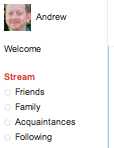
“Chips” – The Stream filters in the left-hand nav
“Huddle” – Huddle is a a group messaging feature available within the Google+ mobile app.
MOBILE APP
- The mobile app has two features of “surpassing awesomeness”: Huddles and Instant Upload. Huddles are everything that messaging was supposed to be but never was — group of people, persistent conversations so you can keep chatting with people, a hell of a lot faster delivery than SMS, etc. Instant upload means that you will never have photos stranded on your phone again.
- The G+ mobile app automatically puts all photos you take on your phone into a private album on Google +, where you can then decide whether or not you want to share them with any circles. Currently on available with an Android phone.
- Disable auto uploads from your mobile device if you are using the Google+ mobile app. – You don’t want your own personal Weinergate. (hat tip to Mike Wilton)
NOTIFICATIONS
- The red notifications box at the top of most Google webpages updates with the number of unread notifications. I dare you to resist it’s magical allure.
- When reading notifications in the drop-down menu you get when you hover over the red box, you can use left and right arrows to swipe through them.
- Bolded names in the Notifications drop down are the ones which are new since the last time you were notified about this post.
- “Notifications” in stream gives you the same sort of stuff that you can see in the notifications menu in the top right. (The one that turns bright red when you have an update — not yet available in all countries) Who’s added you, when you’ve been mentioned in a post or tagged in a photo, etc.
PHOTOS & VIDEOS
- Mousing over someone’s profile name spawns a popup layer that shows a bigger profile photo and let’s you add them to a circle without visiting their profile page
- On a picture page in the Gallery. “Actions” Button > “Edit photo” You’ll find several filters to use on your Picture
- You can click on profile pictures to rotate through them.
- To ensure proper sharing of your photos, go to your photos page and choose “Your albums”. Then go to each album and update the visibility setting to the appropriate circles. Face tagging (and respective stream posts) respects these settings. (hat tip to Nathan Davis)
- If you tag somebody in a photo, you share the entire album with them. They can then tag anyone they want in that album, thereby sharing it with them too.
So there are two things to keep in mind here, unless/until this behavior is changed:
1) Make sure you are ok with sharing an entire album when you share a photo with someone – that is, you should probably organize your photos into groups that make sense when they’re seen together. Don’t just make an “All of my photos” album unless you’re comfortable with people seeing them.
2) There is no way to disable resharing of tagged photos /for the time being/.
One exception to this is your instant upload photos – when you tag or share one, that photo is essentially added to its own album, so it won’t magically share all of the photos from your phone when you share one. (hat tip to Nick Piepmeier)
- Import all your snazzy Instagram pics using http://instaport.me/ (hat tip to +Nathan Folkman)
- According to Picasa, If you’ve signed up for Google+ photos up to 2048 x 2048 pixels and videos up to 15 minutes won’t count towards your free storage. (hat tip to Greg Grothaus)
- To share a photo or a video that has been uploaded to an album, click on the blue “Visible to Only you(edit)” link above the media. This will reveal a share box where you can add people/Circles to share with.
- You can slurp your Facebook photos to Google+ (Picasa) via http://move2picasa.com/.
Move2Picasa is a web application that helps you export all your Facebook albums to picasa and share with your G+ Circle.- How to create a banner for your G+ Profile: Split a 750 x 150 px image into 5 150 x 150 images and upload to scrapbook in order – you can see an example here (hat tip to John Jantsch)
You can also use this tool to do some of the work for you – http://gpluspic.com/bannermaker
- How to rename photo albums in Google+:
Go to one of your albums (http://plus.google.com/photos > Your albums > click an album) and click on the album title. (by Dave Cohen)PLUSRANK
- Rand Fishkin may have uncovered Google’s estimation of the strength of your relationship with other people in your network, or in other words, how much you care about them.
PRIVACY TIPS & SPAM BLOCKING
- Click edit in your profile to change which circles can view what personal details. Your name, gender, and profile picture have to be public, everything else can be restricted. You can also opt out of appearing in the search results here.
- Instant upload. This feature is active by default if you use Google Plus on an Android Smartphone. It will instantly upload photos and video you’ve taken to a Picasa profile for future use. To save on data costs and maintain privacy, this setting can be disabled.
- Beware of fake invites! There have been several reports of fake Google+ invites containing malware and links to sites with the goal of farming your e-mail address.
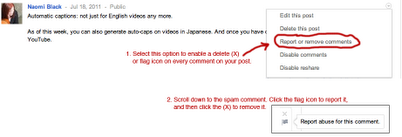
- To delete a spam comment, just look for the Report or remove comments option in the menu in the top-right corner of your post. When you click it, you get a delete (X) and flag icon in every single comment. Click the flag to report a spam or abusive comment. Click the X to delete the comment from your post.
(hat tip to Naomi Black)
PROFILE
- Google Plus Profile Name Policy: At launch, Google+ only supported “common” names for G+ Profile names. Many users who created non-common names got kicked off the service. Brad Horowitz, one of G+’s senior management, recently posted their plans for improving the “Google Plus Namespace” policy. Here are some ways to work around the common name issue:
- If you add nicknames, maiden names, etc. to the “Other names” portion of your G+ profile, those with permission to view those fields can search for you using that term. For example: some of my colleagues call me “elatable,” a pseudonym I’ve used on many services, so I’ve added it to my list of other names.
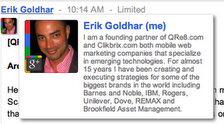
- The “Employment,” “Occupation” and “Education” fields in your profile can appear in your hovercard all across Google+ — to those with permission to view them. This also helps other users find and identify you. In my case “Google+” appears in my hovercard (see screenshot), but I’m already seeing lots of creative uses of this real estate.
- Suspended Accounts: When an account is suspended for violating the Google+ common name standards, access to Gmail or other products that don’t require a Google+ profile are not removed. If your Google+ Profile is suspended for not using a common name, you won’t be able to use Google services that require a Google+ Profile, but you’ll still be able to use Gmail, Docs, Calendar, Blogger, and so on. (Of course there are other Google-wide policies (e.g. egregious spamming, illegal activity, etc) that do apply to all Google products, and violations of these policies could in fact lead to a Google-wide suspension.)
- How to show more information when someone hovers over your avatar like this:
1. Go to “edit your profile”
2. Click on the “employment” section
3. Delete everything
4. In the “Employer Name” field put in anything you want (I think it can be as long as you want as well – not sure)
5. Check the current box
6. Click “save”
7. Refresh Your Browser.
(hat tip to Eric Goldhar)- +me is a utility that lets you make a G+ profile pic in 30 seconds. You also can make a “I’ve moved to Google+” Facebook profile photo
READING POSTS/COMMENTS/NAVIGATION
- THIS ONE IS COOL: Install the Google CSS Tricks Chrome Extension to pin the top of your G+ nav bar to the top of the browser screen as you scroll. Thanks Wepika!
- Hover the mouse pointer over the thumbnail and you will see a list of every peep that commented in that subject.
- Clicking a timestamp takes you to the permalinked post
- It’s critical to use ‘Mute’ actively to shut down posts you don’t want to comment on, otherwise they’ll keep coming back like a cheap burrito. Once you follow a bunch of people, being an active muter is the only way to see the ‘rest’ of your stream.
- Hit the space bar to scroll down a few lines (hat tip to Adam R Sweet)
- Google+ tip for Mac users with trackpads/Magic trackpads. Swipe left/right with 3 fingers to navigate between some of the main sections of Google+ (streams, photos etc.). This behavior seems a little inconsistent. Tested on Chrome browser version 13. (hat tip to Keith Bradnam)
- As you navigate between tabs on the circles page, you can use the browser’s back button to retrace your steps.
RSS SUBSCRIPTIONS TO GOOGLE+
- Here’s how – find the profile # – mine is 114836091191904667858 – then simply use this tool from plusfeed to create this link http://plusfeed.appspot.com/114836091191904667858 and then you can follow any G+ user’s public stream via RSS – of course then you could easily republish you own public stream back on your blog too. (hat tip to John Jantsch)
SEARCH GOOGLE+
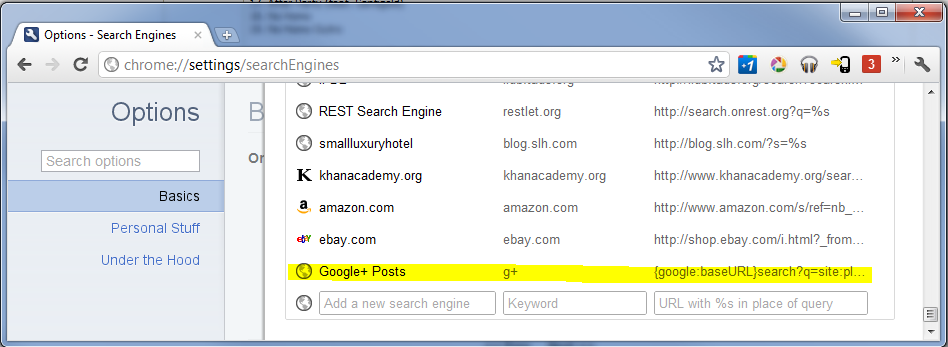
To add Google+ as a search option in Chrome:
Add Google+ search to Chrome.
1. Open URL: chrome://settings/searchEngines
2. Add new entry with following values:(Search in posts)
- Column 1: Google+ Posts
- Column 2: post
- Column 3: {google:baseURL}search?q=site:plus.google.com inurl:posts/* %s(Search for profiles)
- Column 1: Google+ Profiles
- Column 2: profile
- Column 3: {google:baseURL}search?q=%s&tbs=prfl:e
- Try Search Google Plus: a website that has created a directory to find people on Google Plus.
SEND FEEDBACK
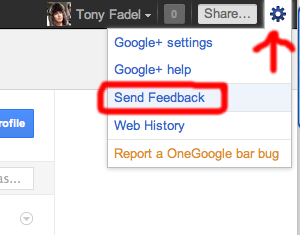
The Google Plus team is constantly iterating on new features and have been actively soliciting requests for improvements. If you have something you want to see click on the Gear icon in the top right nav and a drop down will reveal the “Send Feedback” link (hat tip to Brian Swetland)
- If you want a handy bookmarklet for taking a screenshot and sending to developers without needing to pop open the gear widget, make a new bookmark containing: javascript:appfeedback.startFeedback(event)
(hat tip to Liz Fong)- Bugs are being compiled by Google at the Google Plus Known Issues Page
SHARING/MESSAGING
- New! For Google Plus Facebook App that automatically publishes from Facebook to your G+ stream
- If you’re sharing a post with a small circle of people, you can prevent resharing. Click the arrow at the top-right of the post and choose “Disable reshare.”
- You can’t share Limited posts publicly. (You can still share Limited posts with other individuals and circles.)
- Clicking on Limited next to the timestamp to find out exactly with whom you would be sharing your comments.
- Click on the timestamp on a post to find its permalink URL
- You can add a single individual to the recipient list in the share box, as well as Circles.
- If you want to send a private message to someone, just create a normal post and share it only with them in the “sharing targets” section. Bam! Instant one-on-one conversation! (G+’s version of Twitter DM)
- If you want to make a post publicly visible but aim it specifically at someone, share it with them and also with Public (or also with your circles, etc)
- If you type +<name> or @<name>, it shares the post directly with them, just like if you added their name in the sharing targets. You can also do this in a comment, to pull someone else into the conversation.
- Want to see who can see a post? Next to the dateline at the top of a post, you’ll see something like “Public” or “Limited.” “Limited” is a link — click on it to see who has access.
- At the top right of each post, there’s a little circle-and-triangle menu. For your own posts, this menu lets you edit or delete the post, or disable commenting or resharing. For other people’s posts, it lets you link to the post, mute it, block the person completely, or report abuse.
- If you can’t figure out how to set your share to “Public” try deleting the blue “Your Circles” box below the post box and then click on “+add circles or people to share with…” to get the options in a drop down. (THIS TOOK ME FOREVER TO FIGURE OUT)
- You can edit your posts. If you screw up and make a typo or post something you might regret later, you can edit your post by clicking on the down arrow in the upper right corner of the post box.
- If you make a post “Public”, nobody ever gets mailed.
- If you make a post aimed at your “Friends” circle, people in that circle who aren’t yet in Google+ get mailed.
- After you add a circle in the ‘share’ dialog, hover over it and an option will appear to ‘notify about this post’. That helps you control whether people get mailed.
- You can share your G+ posts to Twitter and Facebook with this Google Chrome Extension.
- How to update your Facebook status from Google+ without an extension:
1. Access Facebook.
2. Go to http://facebook.com/mobile
3. Copy your email address unique.
4. Go to page Circles + Google
5. Add the e-mail from Facebook in a new circle (Hint, call the circle of “Facebook update”)
6. When you want to publish something on Facebook, simply add the circle.Notes:
- Photos are not uploaded on Facebook
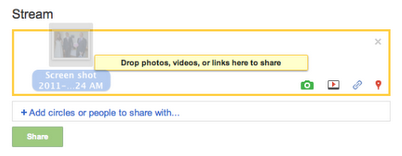
- There may be a limitation on the amount of characters- Drag and drop any media to the share box on desktop version. (hat tip to Florian Seroussi)
- If you want to use vanity URLs to share your G+ posts check out Google Plus Nick at http://GPlus.to (hat tip to Ross Mayfield & Susan Mernit)
- How to Update Facebook From Google Plus Without Using an Extension
- If you’re viewing the Stream through a Circle filter from the left-hand menu and add a post from the top of that page, the default sharing option will be for that Circle instead of Public. (hat tip to Space Bass)
- Share from G+ to your Posterous blog or Evernote: Create a circle and add your posterous email address and then when you find something your want to post, share it to that circle and make sure the Also email box is clicked and G+ will post to your Posterous Blog – this would also work with Evernote and any other email based tool.
- Post to Blogger from Google+:
1) Go to Blogger -> Settings | Mobile and email
2) add a secret word to your blog’s e-mail address
3) Save
4) Create a Circle, and add one contact by e-mail address – use your blog’s e-mail address that you configured in step 2
5) Save the circle
6) when posting in the Stream, add your blog’s circle (make sure to have the “also email…” option checked)- See Creating sharing vs. reading circles by Vincent Mo, Google+ Photos Software Engineer
- A simple way to post to a single circle/stream without having to edit or add to the stream box (it keeps last share circle/people by default) is to simply select the circle from the left navigation bar. (hat tip to James May)
- Post in your Stream in a language you don’t know? In Chrome, if you click “Link to this post” in the post’s menu, the post will open up in a new tab. Chrome will then offer to translate it for you. (hat tip to Trey Harris)
- Drag links directly into the Sharebar to populate a post with the links. (hat tip to Daniel Treadwell)
- If you’re viewing the Stream through a Circle filter from the left-hand menu and add a post from the top of that page, the default sharing option will be for that Circle instead of Public. (hat tip to Space Bass)
SPARKS
- In addition to following people, you can search for interesting stuff to share about particular topics in the Sparks section on the side menu of the main page. Click Sparks, and search for things that you’re interested in or browse through the featured topics; if you want to pin a search on your sidebar for easy future access, click the Add Interest button under the search field.
- Random side note: While debugging the system, Google often used “Chocolate Cake” as a test interest. It turned out to be a really distracting interest.
| - In sparks, the pipe does an “or” search (haven’t been able to get this to work)
TEXT FORMATTING
*bold*
_italics_
-strike-through-
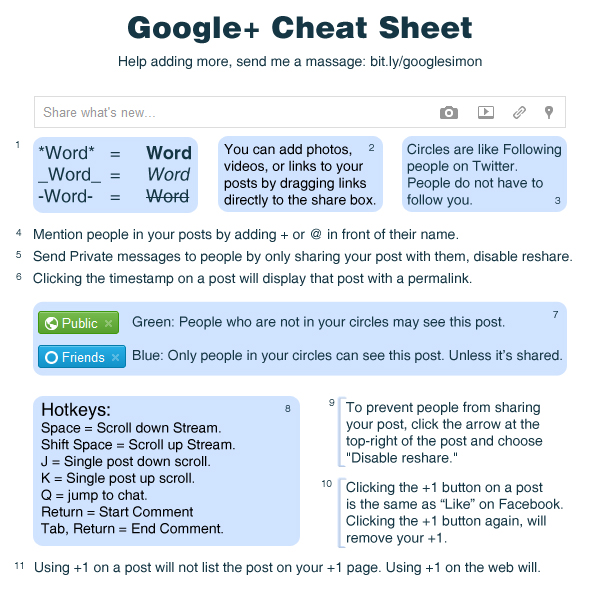
GOOGLE PLUS CHEAT SHEET
Simon Lautsen put together this excellent graphic summary of some of the more popular tips:
If you enjoyed this post please add me to your Circle. I promise not to sully your Stream
And if you like your content the old-fashioned way, get my RSS feed


Local SEO Guide is Andrew Shotland's blog on local search optimization, small business marketing & search engine optimization strategy.


Are You A Victim Of Phantom Vibration Syndrome? | Fast Company
You might laugh, but do you find yourself reaching for a vibrating phone in your pocket, only to discover that it's not there? I've come across this so often that I've come to call it Phantom Vibration Syndrome. Think about it: How many times have you checked your phone today for messages, despite no sign or signal that there's one waiting in the inbox? What's going on in your brain that leads you to think that a message came through without you noticing it? Or, worse still, what makes you think that that the messages will somehow flow in faster if you check your phone more frequently?
Some years ago I conducted a major research study on smoking. I wanted to find out if the simple act of observing a person smoking would be enough to encourage other smokers to smoke. To cut a long story short, the answer was a resounding "Yes." Using fMRI we learned that something called Mirror Neurons are activated the moment a smoker sees another smoker lighting up. Mirror Neurons give credence to the old saying "Monkey See, Monkey Do." It's a built-in mechanism connected to the empathy emotion, and it partly explains the popularity of sport and pornography. Both activities take us beyond observation, because in our brains we're actually participating.
In the study on smoking, we learned that the Mirror Neurons would kick-start a chain reaction in the smoker's brain, which would induce craving sensations. In other words, whenever smokers observe another smoking, there's no opt-out because the tobacco user's brain is hardwired to be seduced into lighting a cigarette. So, for example, when Leonardo DiCaprio lights up a cigarette on screen (he frequently smokes in his movies), it sadly has an enormous affect on those watching the film.
You may ask, what on earth this all has to do with you and your phone? It's probably the exact same brain reaction whenever we switch on our cell phone. Cast your mind back to the last time you spent casually chatting around a table with a group of friends. Think about what happens when one or another checks their messages. In a matter of moments, a few others in the group will feel around for the phones and check their screens too. If you were to ask them what prompted them to check at that particular moment, they'd have no idea. And, without any solid scientific evidence to back my claim, I'd venture to say it was caused by the activation of the Mirror Neurons. Monkey saw, and monkey did.
Apart from habit, Phantom Vibration Syndrome is also about not being fully present. As much as we all believe we're skilled multi-taskers, for the record, we're not. Quite simply, we're no longer fully present. By this I mean emotionally as opposed to physically. We think we are, we think we're participating in the conversation, but in reality, we're not.
Recently, I met with a group of interesting people. As the night progressed I noticed something missing: no one was checking in with their phone. They were listening and talking uninterrupted. There were no electronic beeps, and all eyes stayed focused on the task. And as our conversation stalled as we pondered a question, no one rushed to Google the answer on their smart phone. Instead we discussed, debated, and even argued, eventually finding our way to a resolution. It was a fascinating, and dare I say fun process that would have been totally bypassed if we had an iPhone or an iPad, or a BlackBerry at hand.
This group of people is not unique. As I interview hundreds of kids all over the world, it has become clear that a growing number are rethinking the role of electronic connectivity in their lives. They see their parents' dependency close-up, and reject this 21st-century addiction to gadgets. They don't want to take their BlackBerrys to bed, nor do they want to take a back seat to whatever electronic impulse interrupts their dinner. Who can blame a generation of Chinese kids who see a special shelf for their cell phone beside the toilet? No kidding!
So, the moment you realize that you've fallen victim to the Phantom Vibration Syndrome, you should be aware that it's more than a pulsing sensation in the pocket. The risk is that you might find yourself checking your messages in response to someone doing the same, no longer fully present in the real world. Then again, you might ask yourself who cares if everyone else lives in the same virtual world alongside you?
Martin Lindstrom is a 2009 recipient of TIME Magazine's "World's 100 Most Influential People" and author of Buyology: Truth and Lies About Why We Buy (Doubleday, New York), a New York Times and Wall Street Journal best–seller. His latest book, Brandwashed: Tricks Companies Use to Manipulate Our Minds and Persuade Us to Buy, will be released in September. A frequent advisor to heads of numerous Fortune 100 companies, Lindstrom has also authored 5 best-sellers translated into 30 languages. More at martinlindstrom.com.
Read more by Lindstrom: What CEOs Can Learn From Siberian Teenagers


via fastcompany.com
GM's Autonomous Pod Cars Are Coming To A Megacity Near You | Fast Company
GM's Electric Networked-Vehicle (EN-V) was an instant hit when it was first unveiled last year; the electric, autonomous (no steering wheel!) pod-like car is nothing if not futuristic and friendly-looking. It's like GM finally offered us the Jetsons future that we've all been waiting for. GM denies the recent rumors that it has set a production date for the EN-V, but rest assured, it's coming. We spoke to Sam Abuelsamid of GM's advanced technology communications team to get the details on when we'll all be pod-driving people.
The prototype vehicle, which has been touring expos, car shows, and conventions, doesn't necessarily represent what the production EN-V will look like. The two-wheeled concept is based on a Segway balancing platform, has low ground clearance, can't drive in rain or snow, and doesn't even have the juice to make it up a driveway ramp. Abuelsamid explains that the production version will retain the basic features--small size, advanced communications and sensing technology, vehicle to vehicle (and vehicle to infrastructure) communications, and, of course, an electric powertrain--but it will be "designed to be more practical for real-world use."
GM hopes to begin field trials in the next two to three years, but the vehicle probably won't go into production for about 10 to 15 years, largely because of our current lack of precise GPS capabilities. "A big part of autonomous capability comes from GPS. Our current precision is a maximum of three meters, which really isn't adequate for reliable autonomous operation," says Abuelsamid. "Over the course of the next decade or so, [they] will put up new GPS satellites to improve precision and reliability. We're hoping that gets improved, but in the interim we can still learn a lot."
Once the EN-V is ready for production, it could be deployed in any number of places--gated communities, college campuses, and megacities, where pollution and overcrowding could be alleviated by the emissions-free pod cars. Abuelsamid also speculates that the EN-V could make an ideal addition to a car-sharing service, since users could both summon the vehicle using a smartphone app and tell the EN-V to park itself when they're finished using it.
GM is rumored to be in talks with cities in China, South Africa, and the U.S. about creating an infrastructure for the vehicle, which will cost approximately $10,000 when it goes on sale.
[Image: GM]

via fastcompany.com
NO MAD LAWS – PETITION « GypsyMessageBoard
NO MAD LAWS – PETITION
June 24th, 2011 § 21 Comments
BackgroundLEGAL AID BILLADVICE AND REPRESENTATION TO GYPSIES AND TRAVELLERS
The Legal Aid Bill1 was published on the 21st June 2011.
If brought into force as it stands now this Bill will have disastrous effects on the provision of advice and representation to Gypsies and Travellers on accommodation issues (to say nothing of the disastrous effects on many other areas of the law such as welfare rights, debt and education to name but a few).
Clause 8 of the Bill states that civil legal services will only be available in those areas detailed in Schedule 1 Part 1 of the Bill.
Clause 26 provides that the Lord Chancellor may provide services by means of telephone advice. On the same date as the publication of the Bill the response to the consultation on Legal Aid has been published2. There had been a proposal that telephone advice should be the “mandatory single gateway” to Legal Aid assistance (which would mean that only those providers who had telephone advice contracts would be able to deal with that initial stage). At para 146 of the consultation response the Government has stated that,initially, they will confine this proposal to four areas of law: debt; special educational needs; discrimination cases; and community care. At paragraph 153 they confirm that the Community Legal Advice Helpline will continue in the following areas: debt; special educational needs; discrimination; community care; family; housing.3
Schedule 1 Part 1 of the Bill contains those services which remain in the scope of Legal Aid (by this is meant all forms of advice, assistance and representation). At paragraph 17(1) “Judicial Review” is kept within scope. However paragraph 17(2) makes 17(1) subject to the exclusions in Schedule 1 Part 2. Part 2 paragraph 5 excludes ‘trespass to land’.
At paragraph 27 onwards “loss of home” is kept within scope but the following should be noted:-
(8) In this paragraph “home”, in relation to an individual, means the house, caravan, houseboat or other vehicle or structure that is the individual’s only or main residence, subject to sub-paragraph (9);
(9) References in this paragraph to an individual’s home do not include a vehicle or structure occupied by the individual if there are no grounds on which it can be argued –
(a) that the individual is occupying the vehicle or structure otherwise than as a trespasser, and that the individual’s occupation of the vehicle or structure began otherwise than as a trespasser(10) In sub-paragraphs (8) and (9), the references to a caravan, houseboat or other vehicle include the land on which it is located or to which it is moored.
Excluded services are listed at Schedule 1 Part 2. Gypsy and Traveller planning work (in other words High Court planning appeals, planning injunction actions, challenges to Stop Notices and direct action etc) are not mentioned but (subject to what I say later) must be taken to be excluded by not being included in Schedule 1 Part 1.
In its consultation response the Government accepts that the majority of the over 5,000 responses they received were against the reforms. Nevertheless they are willing to fly in the face of those responses. For example at paragraph 41 of the consultation response they state:-
Over 90% of Respondents to the consultation disagreed with the proposals to remove from the scope of Legal Aid those cases and proceedings set out in the consultation.
At paragraph 234 of the consultation response the Government conclude that they will proceed with a 10% reduction to all fees paid under the Civil and Family Legal Aid Schemes. At Annex B paragraph 74, the Government relate the key issues raised in the consultation on Housing cases (which incorporates Gypsy and Traveller accommodation cases). They state that one of the key points raised by Respondents was:-
Funding should be provided for planning appeals and eviction cases involving Gypsies and Travellers because this group was one of the most vulnerable in society.
However, in their response to the consultation from paragraph 75, they fail to actually respond to that point.
Cathay Birch of Gypsy Message Board has set up a petition to the Government.NO MAD LAWSWe the undersigned call upon the Government to ensure that Legal Aid in the Legal Aid Bill 2011 is available for Gypsies and Travellers to defend evictions from unauthorised encampments and to be advised and represented in High Court planning matters. It is due to the failures of successive central and local Governments to ensure adequate site provision that some 25% of the Gypsy and Traveller population who live in caravans are on unauthorised encampments and unauthorised developments. This is through no fault of their own. Gypsies and Travellers are one of the most disadvantaged groups in the United Kingdom and the Government must ensure that they have access to legal advice and assistance just as any other group does.PLEASE SIGN THIS PETITION.
Google+ Dale Farm Essex
Daily Mail, 26/07/2011 The eviction of 400 Irish travellers from Dale Farm in Essex – the largest gypsy settlement in Europe – was always likely to be a controversial move, and one in which the press would take an interest. The Sun and Mail today reported however that this eviction may be ...Share - Share on...TWO Essex Bishops have expressed their “very deep concern” over a planned £18m eviction of Dale Farm traveller site in Crays Hill. The Bishop of Brentwood, the Rt. Revd Thomas McMahon, and the Bishop of Chelmsford, the Rt. Revd Stephen Cottrell, released a joint statement on Tuesday condemning ...Share - Share on...PREPARATIONS are under way in north Essex for a feared influx once Europe's largest illegal travellers' camp is emptied this autumn. Basildon Council has handed eviction notices to 90 families living illegally on Dale Farm, ordering them to leave by August 31. ...Share - Share on...Hundreds of Travellers, many with connections to Rathkeale, Co Limerick, have lived at the Dale Farm camp outside Basildon in Essex for up to 10 years, but more than 60 families were issued with eviction notices on Monday evening. The land was purchased by a Traveller in 2000, who then sold ...Share - Share on...Travellers and Gypsies at Europe's largest traveller site have been ordered to leave after 10 years of legal wrangling, but as they prepare to say goodbye to Dale Farm in Essex they warn things could get ugly. "We can't just vanish off the face of the earth, we're human, we just want what ...Share - Share on...Film-maker Richard Parry has been following the conflict over Dale Farm, Essex, for six years. Now, with a mass eviction on the way he asks if there is a better way of resolving such a long-running conflict Dale Farm Travellers' site in Essex. Photograph: Susan Craig-Greene for the Guardian ...Share - Share on...That's the awful prospect hanging over Travellers at the Dale Farm site in Basildon, Essex. Basildon council issued eviction notices to the Travellers last week. They say that everyone has to leave by 31 August—or they will be forcibly removed. Dale Farm is one of the biggest Traveller sites in ...Share - Share on...The action comes after 51 families at Dale Farm travellers' site near Billericay were issued with final ... With eviction from Dale Farm imminent, we can expect traveller families to be seeking sites all ... across Essex from Colchester at the weekend but they are nothing to do with Dale Farm. ...Share - Share on...Documentary filmed over the past six years, following the long-running dispute surrounding Europe's largest traveller site in Dale Farm, Essex, and tracing events as it nears its conclusion. For 10 years, 50 families have illegally occupied green-belt land, but have now been given 28 days to ...Share - Share on...


via plus.google.com
Subscribe to:
Posts (Atom)